50 Named Design Styles for Better AI Prompts
A free Claude skill with 50 named design styles, each with a reference image, a prompt scaffold, and starter CSS tokens. Naming a style up front gives any AI tool a sharper, more consistent result.
There is a moment most people hit with AI image tools. You can see the thing in your head, but the words coming out are mush. “Make it clean but warm, modern but not cold, premium but approachable.” The model gives you a beige gradient and a sad icon. The problem is not the model. The problem is that a vibe is not a brief.
The fastest fix I have found is to name a style. “Make it Art Deco.” “Japandi version.” “Synthwave, but restrained.” A named style carries a whole package with it, the palette, the type, the textures, the mood, so the model stops guessing and starts pointing in one direction. Designers have always worked this way. The rest of us just never learned the names.
So I built a small Claude skill to fix that for myself, and I am releasing it free.
What it is
design-styles is a library of 50 named design styles. Each one has three things attached:
- A reference image, so you can SEE the style rather than just read about it.
- A prompt scaffold, a ready-to-fill sentence you drop into any AI image or video tool.
- Starter CSS tokens, credible default colours to lift straight into a carousel or a frontend build.
It is built on top of a UX Planet guide to 50 design styles, extended with the scaffolds and tokens so it actually does work in a content and build pipeline, not just sit there as a reading list.
Browse all 50 in the gallery →
Why naming a style works
A model trained on the whole internet knows what Baroque looks like far better than it can interpret “ornate and dramatic”. When you name the style, you are handing it a dense, shared reference instead of a fuzzy adjective. Your job shrinks from describing everything to choosing a direction and filling in the subject.
Here are four of the fifty, to show how different the packages are.
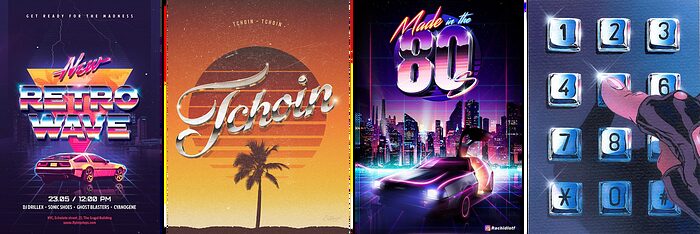
Synthwave is neon grids, sunset gradients, and chrome. It says retro-future the instant it loads.
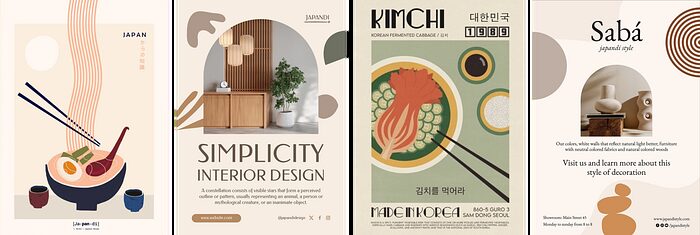
Japandi is the opposite energy, warm minimalism, natural materials, and a lot of calm negative space.
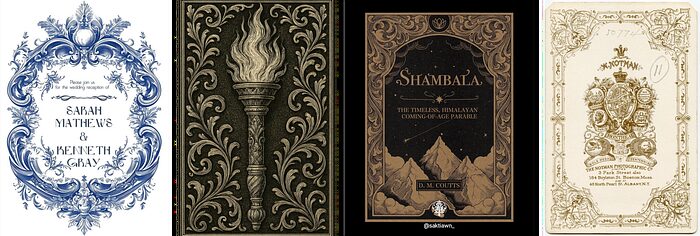
Baroque is gold on dark, flourishes, and drama, for when you want something to feel opulent and theatrical.
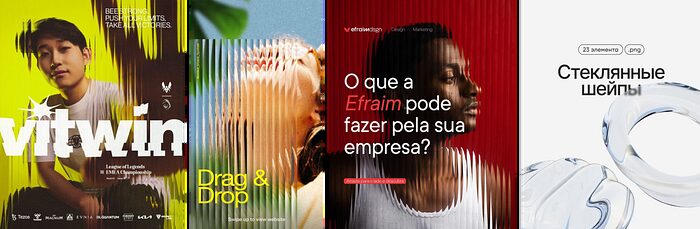
Glassmorphism is frosted, translucent layers with soft depth, the premium SaaS look.
You would never confuse one for another, and neither will the model once you name it.
How to use it
Pick or get given a style. If you already know the direction, go straight to its entry. If you are exploring, pull three or four candidates for the same idea and look at them side by side. Visual clarity is decision clarity.
Fill the scaffold. Start the prompt with the style name, then add your real subject, composition, lighting, and aspect ratio. The brackets in each scaffold tell you exactly what to swap in.
Mix two for a hybrid. This is where it gets fun. “Luxury Typography meets Aurora.” “Vaporwave with Gothic.” Once you know each style’s DNA, you can blend them on purpose instead of by accident.
A word of honesty: the starter tokens are a starting point, not a finished palette. Tune them for contrast and hierarchy before you ship. And if a project already has a brand system, that system wins. These styles are for experimenting, for greenfield work, or for client projects without a fixed identity yet.
Get it
git clone https://github.com/Keith-cclarity/design-styles.git ~/.claude/skills/design-stylesThen type /design-styles in Claude Code, or just browse the gallery and the repo and lift what you need. It is free and open source.
If you want to go further with this kind of thing, the best way is alongside other people working it out too. I run AI Power Users, a free meetup community in Singapore for people putting AI to work.
Frequently asked
- What is the design-styles skill?
- It is a free, open source Claude skill with 50 named design styles, from Neoclassical and Baroque to Synthwave, Japandi, Glassmorphism, and Neo-Brutalism. Each style ships a reference image, a ready-to-fill AI prompt scaffold, and starter CSS tokens, so you can steer image, video, and frontend output by naming a style instead of describing a vibe.
- Do I need Claude Code to use the styles?
- No. The skill is most convenient inside Claude Code, where you type /design-styles, but the catalogue, the prompt scaffolds, and the reference images work with any AI image or video tool. You can paste a scaffold into ChatGPT, Higgsfield, or any model and get the same benefit.
- How do I install it?
- Clone the repo into your Claude skills folder: git clone https://github.com/Keith-cclarity/design-styles.git ~/.claude/skills/design-styles. Then invoke it with /design-styles, or just browse the catalogue and reference images directly in the repo.
- Can I mix two styles together?
- Yes, and it is one of the most useful things you can do. Once you know each style's core elements, you can blend two, for example Vaporwave with Gothic, or Japandi with Neo-Brutalism. State both names and combine their palettes and elements in one prompt.